What You'll Learn
- Why authentication is not the same as authorization
- How grants and Supabase RLS work together
- How to keep database rows and private files inside the same ownership boundary
- When privileged work belongs behind a server function
- Why negative tests matter as much as successful requests
Quick Take
Supabase RLS can protect user data at the database, but adding authentication does not automatically make an application private. Authentication identifies the caller. Authorization decides what that caller can read, create, change, or delete.
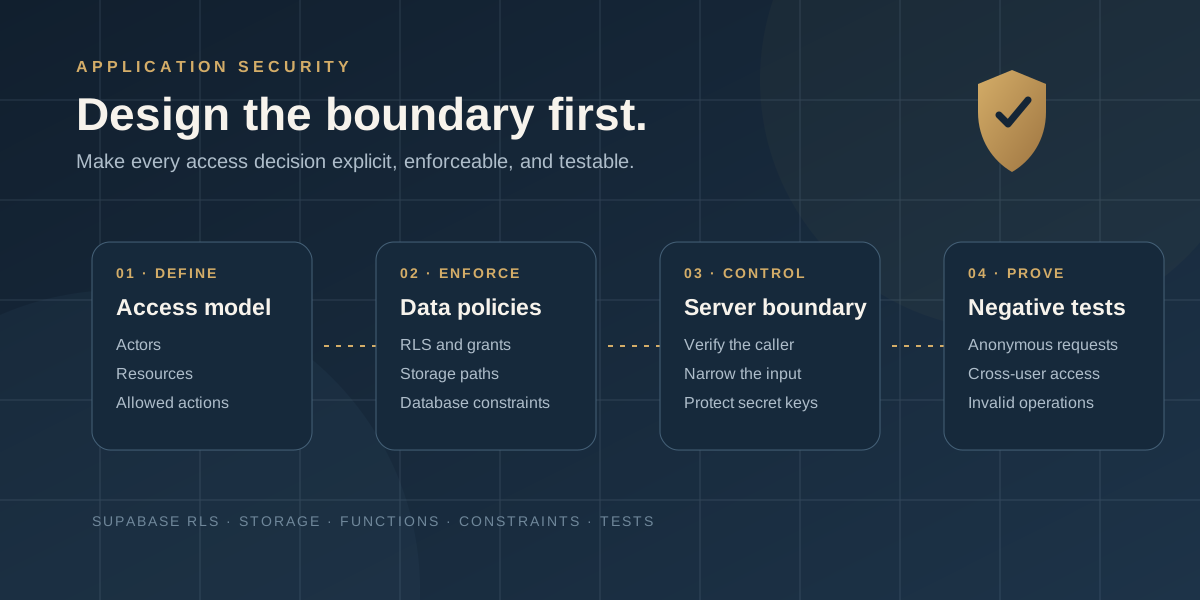
A dependable privacy boundary usually spans Postgres grants, Row Level Security policies, Storage policies, server-only functions, database constraints, and tests. Define that boundary before building each feature, then enforce it at every layer that touches the data.
The examples below are newly written and intentionally generic. They reflect patterns used in Markivia-owned application work without reproducing production identifiers, secrets, private data, or proprietary business logic.
1. Start With an Access Model, Not a Screen
A screen is not a security boundary. Hiding a button may improve the interface, but it does not stop someone from calling an API directly.
Before writing a policy, identify the actors, resources, and allowed actions:
- What can an anonymous visitor read?
- Which records belong to one authenticated user?
- What may be shared with a collaborator?
- Which operations require a trusted server?
- Which actions need an audit trail?
For a simple user-owned application, public content may be readable by anyone, while a workspace and its documents remain available only to the owner. Billing events may expose a small set of fields to the owner while allowing only a trusted backend to create or reconcile them.
This exercise forces ambiguous decisions into the open. If a resource can be shared, define the relationship that grants access. If a server can bypass ordinary policies, document why it needs that privilege.
2. Use Grants and Default-Deny Supabase RLS
Supabase's current guidance treats Postgres grants and RLS policies as two separate controls. Grants decide whether a role may attempt an operation on a table. Policies decide which rows that operation can affect.
Start by creating the table, enabling RLS, removing broad client-role privileges, and granting back only the operations the application needs:
create table public.workspaces (
  id uuid primary key default gen_random_uuid(),
  owner_user_id uuid not null references auth.users(id),
  name text not null,
  created_at timestamptz not null default now()
);

alter table public.workspaces enable row level security;

revoke all on table public.workspaces from anon, authenticated;
grant select, insert, update, delete
  on table public.workspaces
  to authenticated;
Then create a separate policy for each operation:
create policy "Owners can read their workspaces"
on public.workspaces
for select
to authenticated
using ((select auth.uid()) = owner_user_id);

create policy "Owners can create their workspaces"
on public.workspaces
for insert
to authenticated
with check ((select auth.uid()) = owner_user_id);

create policy "Owners can update their workspaces"
on public.workspaces
for update
to authenticated
using ((select auth.uid()) = owner_user_id)
with check ((select auth.uid()) = owner_user_id);

create policy "Owners can delete their workspaces"
on public.workspaces
for delete
to authenticated
using ((select auth.uid()) = owner_user_id);
The ownership test happens in the database. Insert and update policies also validate the proposed row, which prevents a signed-in user from assigning a record to someone else.
An update also needs a matching select policy to behave as expected. Test the complete operation instead of assuming an update policy works in isolation.
3. Validate the Parent When Creating Child Records
Ownership often lives on a parent row while a child stores only the parent's ID. A document, for example, may belong to a workspace:
create table public.documents (
  id uuid primary key default gen_random_uuid(),
  workspace_id uuid not null
    references public.workspaces(id) on delete cascade,
  title text not null,
  storage_path text,
  created_at timestamptz not null default now()
);

alter table public.documents enable row level security;
revoke all on table public.documents from anon, authenticated;
grant select, insert, update, delete
  on table public.documents
  to authenticated;
The child policy should verify that the referenced parent belongs to the caller:
create policy "Owners create documents in their workspaces"
on public.documents
for insert
to authenticated
with check (
  exists (
    select 1
    from public.workspaces w
    where w.id = workspace_id
      and w.owner_user_id = (select auth.uid())
  )
);
Use the same relationship for read, update, and delete policies according to the access model. This blocks a signed-in user from attaching a child row to another user's parent.
If the product supports shared workspaces, use an explicit membership table and role. Avoid making authorization decisions from user-editable profile metadata.
4. Protect Storage With the Same Ownership Boundary
Database privacy does not automatically protect uploaded files. Supabase Storage uses policies on storage objects, so the bucket, object name, and associated database record need their own review.
A bucket is the container for files. In this example, the bucket ID is private-files; it is not part of the object's name. The object's key, stored in storage.objects.name, is:
user_id/workspace_id/document_id.pdfUse a private bucket when the files require access control. Supabase's storage.foldername(name) helper reads folder components from the object name, so the first component in this example is user_id, not the bucket ID.
An upload policy can require the first folder to match the authenticated user:
create policy "Users upload only to their private folder"
on storage.objects
for insert
to authenticated
with check (
  bucket_id = 'private-files'
  and (storage.foldername(name))[1] =
    (select auth.uid())::text
);
Create matching read, update, and delete policies based on the product's access model. When a file belongs to a database record, validate both the path and the related row when practical.
Do not treat a difficult-to-guess URL as authorization. A file is private because the policy denies unauthorized access, not because its name is obscure. Signed URLs provide temporary access, but the code creating one must still verify that the caller may access the underlying object.
5. Keep Privileged Work Behind a Server Boundary
Some operations need elevated access, such as processing a payment webhook, running a scheduled job, generating an account export, or reconciling administrative data.
Supabase publishable keys are designed for public application components. The user's authenticated session and database policies determine what those components may reach. Secret keys resolve to the service role and bypass RLS, so they belong only in developer-controlled backend components.
Never place a secret or legacy service-role key in browser code, a mobile bundle, logs, screenshots, or a public repository.
A privileged function still needs an authorization design:
- Identify whether the caller is a signed-in user, trusted service, or external webhook.
- Validate the caller or provider signature before privileged data access.
- Validate and narrow the input.
- Perform only the operation the endpoint exists to perform.
- Return the smallest necessary response.
- Avoid logging secrets or sensitive payloads.
The server boundary is a controlled exception for work that cannot safely happen through the user's ordinary database role. It is not a shortcut around authorization.
6. Put Concurrency Rules in the Database
Authorization determines whether someone may attempt an operation. Constraints determine whether the resulting data is valid.
If two requests try to create the same record at nearly the same time, a client-side check can pass for both before either insert finishes. A unique constraint remains authoritative:
alter table public.documents
add constraint documents_workspace_title_unique
unique (workspace_id, title);
Use application validation for helpful feedback, then use database constraints for rules that must remain true. Foreign keys protect parent relationships. Check constraints restrict invalid states. Unique or exclusion constraints can protect against duplicates or overlapping reservations.
7. Test the Denials, Not Only the Successful Path
A privacy test suite should prove what each actor cannot do. For every protected resource, test:
- Anonymous read and write attempts
- Owner read, insert, update, and delete operations
- A second authenticated user's access to the owner's row
- Attempts to create a child under another user's parent
- Attempts to change an ownership field during an update
- Uploads to correct and incorrect Storage paths
- Expired or missing sessions
- Server-only operations with missing or invalid credentials
Supabase supports database testing with its CLI and pgTAP. Keep the tests beside the schema changes and run them in the deployment workflow.
supabase test dbA policy that works for the owner but has never been tested against another authenticated user has not been fully tested.
8. Review the Boundary as the Product Grows
Privacy gaps often appear when a later feature reuses data in a new context. A personal workspace gains collaborators. A private document becomes part of an export. A scheduled job begins processing rows across many users.
For every material feature, revisit the access model:
- Is this resource still owner-only?
- Does a new relationship grant access?
- Does the browser need this data, or can the server return less?
- Does a new Storage path have matching policies?
- Can concurrent requests break a business rule?
- Which denial tests must be added?
Keep these answers close to the schema and tests. Future developers should not have to infer the security model from interface code.
A Practical Supabase Security Review Sequence
- Inventory exposed tables, views, functions, Storage buckets, and Edge Functions.
- Map anonymous, authenticated, owner, collaborator, and server access.
- Review grants and confirm RLS is enabled on every exposed table.
- Review select, insert, update, and delete policies separately.
- Trace ownership through parent-child relationships.
- Review every Storage operation and object path.
- Locate every elevated key and confirm it stays server-side.
- Add constraints for rules that must survive concurrent requests.
- Write negative tests for cross-user and anonymous access.
- Repeat the review whenever a feature changes the access model.
The goal is not to create the largest policy file. It is to make every access decision explicit, enforceable, and testable.
If you are still deciding whether a workflow belongs in a configurable tool or a dedicated application, read when a business needs custom software.
Markivia Digital designs and builds web applications, mobile apps, and custom business systems. If you are planning a Supabase application or reviewing an existing build, send us a short description of the data and workflows involved. We can talk through a practical next step.